Remix an Open-Source Board: USB-A to USB-C, Re-Routed in 3 Minutes
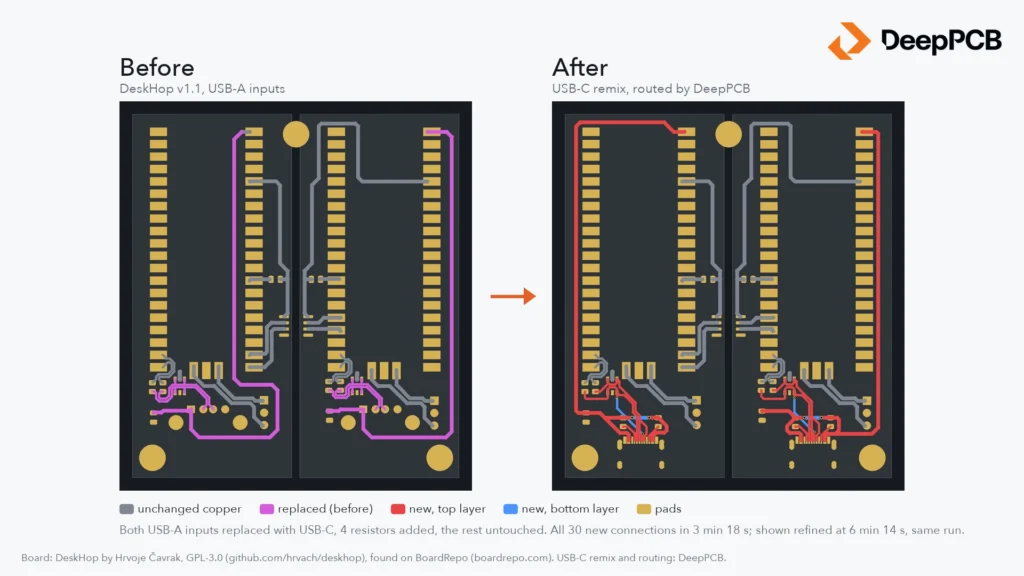

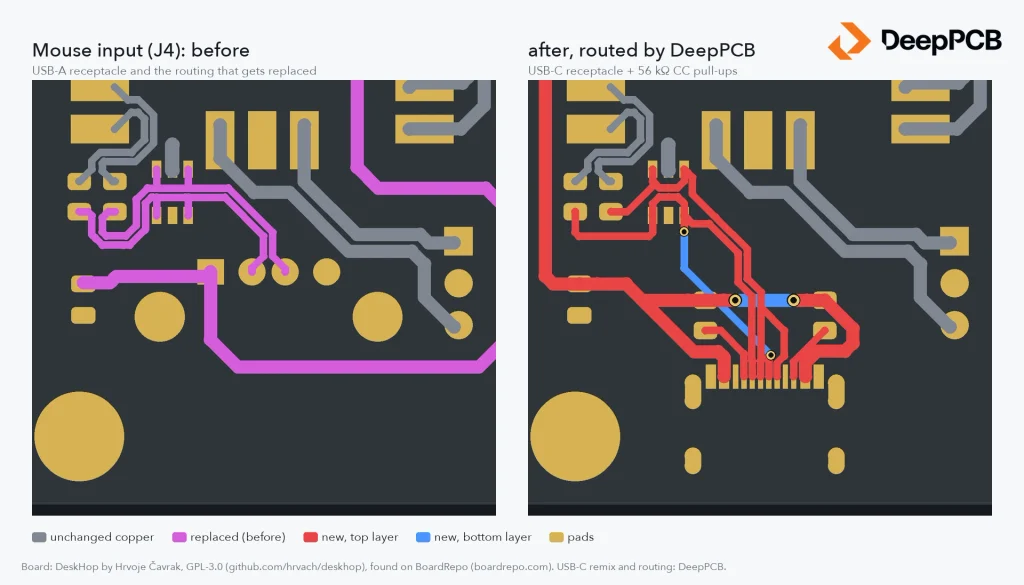
We took DeskHop, an open-source keyboard and mouse switch, replaced both USB-A inputs with USB-C, and let DeepPCB route only what changed. All 30 open connections were made in 3 minutes 18 seconds. The board shown is the same run at 6 minutes 14 seconds, refined by DeepPCB, with no new KiCad DRC errors. The author’s other routing was not touched.
Open-source hardware is more often a starting point than a finished product. You find a board that does most of what you need, and you change the rest: a different connector, a part you can actually buy, a sensor that fits your enclosure. The schematic edit takes ten minutes. Then you open the layout, which someone else drew, and the routing around the new part becomes the real job.
That is the case we wanted to test. A small, believable change to a board somebody else designed, with their routing left exactly as they made it.
In short
| The change | Both USB-A inputs replaced by USB-C receptacles, plus four 56 kΩ pull-ups on the CC pins |
| What DeepPCB routed | The 30 connections the change left open |
| What stayed | The author’s other 114 tracks, locked so the router could not move them |
| Time to all 30 connections | 3 min 18 s |
| Board shown | The same run at 6 min 14 s, refined by DeepPCB, no manual cleanup |
| KiCad DRC with schematic parity | No new errors, nothing unconnected |
The board
DeskHop, by Hrvoje Čavrak, lets one keyboard and mouse work across two computers: drag the pointer off one screen and both follow it to the other machine. The board carries two Raspberry Pi Pico modules with full galvanic isolation between the two outputs. It is certified open-source hardware and published under GPL-3.0. We used hardware revision 1.1, a two-layer board.
We found it on BoardRepo, the hardware platform Kai Yang is building, where thousands of open-source boards open in any browser, schematic and layout included, with no CAD tool needed.
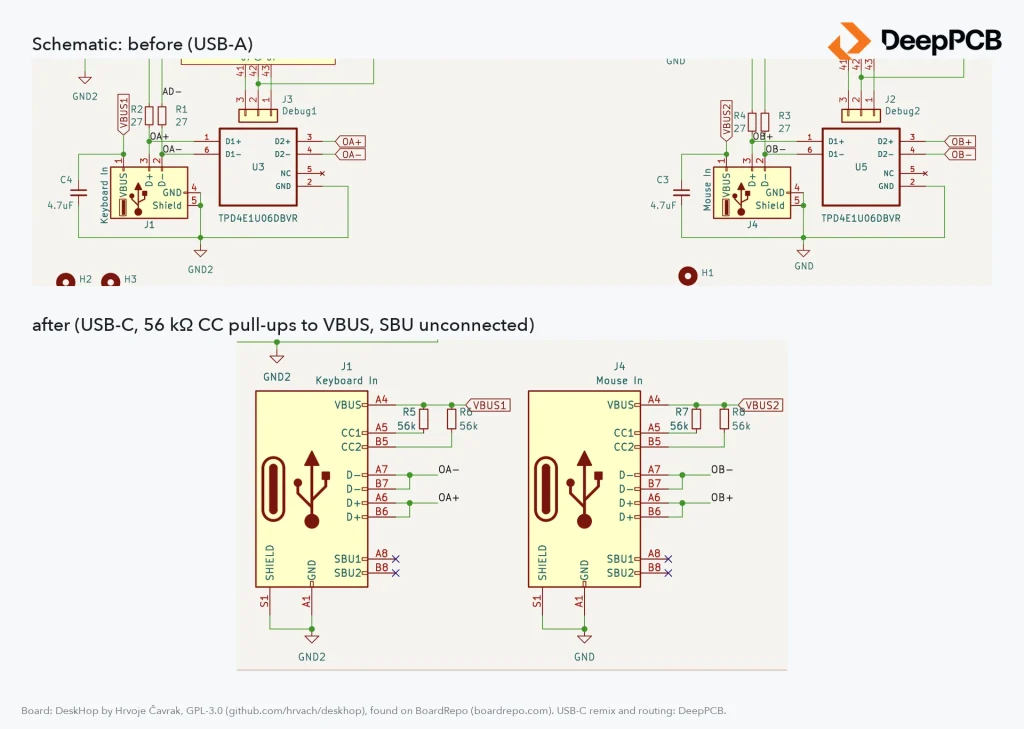
The change: both USB-A input receptacles, for the keyboard and the mouse, become USB 2.0 Type-C receptacles at the same spots on the board edge. A USB-C port that supplies power also needs a pull-up on each of its two CC pins so the attached device knows it can draw current, so four 56 kΩ resistors go in next to the connectors. VBUS stays on, as it was with USB-A; a fully spec-compliant USB-C source would switch it on only once a device is attached.
Four steps
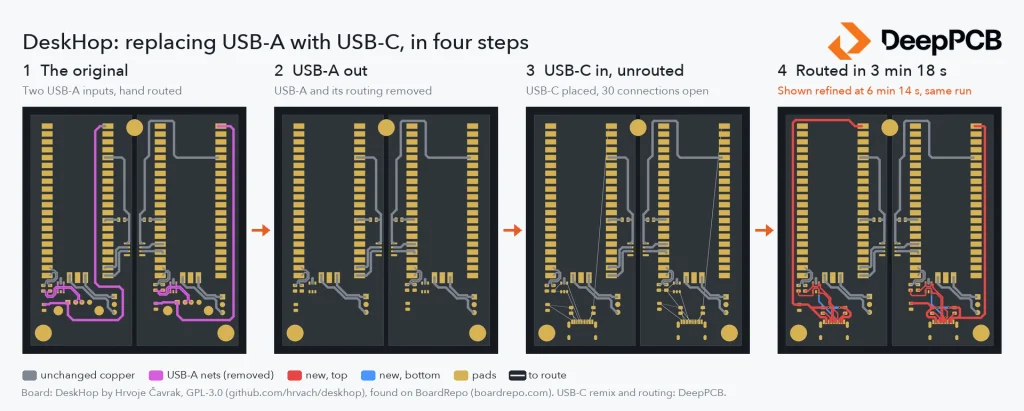
- The original, as published.
- Both USB-A receptacles removed, and every track on their nets with them.
- The USB-C receptacles and pull-ups placed. The lines are the connections still to make.
- Routed by DeepPCB: every connection made, then refined in the same run.
What we asked DeepPCB to do
- Keep the author’s work. Every track on a net the change does not touch was locked, so the router could only work around it.
- Route only what changed. Both VBUS supplies, both USB data pairs and the four new CC lines.
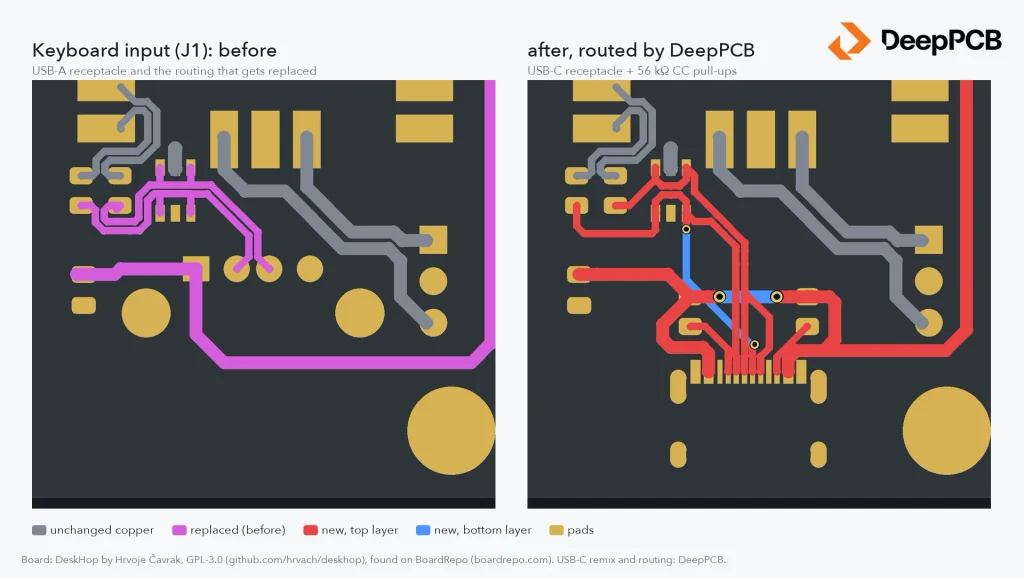
- Follow the author’s rules. The USB data lines are differential pairs with the original’s 0.3 mm width and 0.25 mm gap, narrowing only where they enter the USB-C pins.
We started the routing and let DeepPCB run. All 30 connections were made after 3 minutes 18 seconds. DeepPCB kept refining the routing, and the board shown is the same run at 6 minutes 14 seconds: a first pass, with no manual cleanup.
Up close
How we checked it
A connection count is not a check, so we wrote the routed copper back into KiCad, refilled the ground pours and ran KiCad’s DRC with the schematic parity check: no new errors, nothing left unconnected, and the schematic and board agree. Every new track also stays on its own side of the isolation barrier between the board’s two halves.
Remix, then route
BoardRepo’s own example shows how a remix starts: an AI assistant changes a resistor on an open-source board and saves a copy to your workspace, based on the original. A new resistor value needs no new copper. A new connector does, and that is the step DeepPCB took here.
FAQ
Can DeepPCB route only part of a board? Yes. Lock the copper you want to keep, and it routes the remaining connections around it.
Do I need to set up the design rules again? No. They come from the net classes in your KiCad project. Keep the new connections in the same classes as the copper they join, and the new routing follows the same widths and spacing.
Which design files does it take? KiCad projects like this one, Altium, EasyEDA and Zuken files, and Specctra DSN, which is also how Eagle designs come in.
Who made the original board? Hrvoje Čavrak. DeskHop is open-source hardware published under GPL-3.0 at github.com/hrvach/deskhop.
Credits
Board: DeskHop by Hrvoje Čavrak, licensed under GPL-3.0, github.com/hrvach/deskhop. Found on BoardRepo, with thanks to Kai Yang. USB-C remix and routing: DeepPCB.
Try it on your own board at app.deeppcb.ai.
Check out our benchmarks at deeppcb.ai/benchmarks.

